

Before you start
- A Darkbloom account with funds. Jobs draw on the same balance as Darkbloom inference.
- A public repository. Darkbloom runs public repositories only. Private repositories cannot be requested.
- Administration of the GitHub account or organization that owns the repository, so you can install the App and pick its repositories.
Sign in
Open https://api-sandbox.darkbloom.dev and sign in with your Darkbloom account.Install the GitHub App and link it for billing
- On GitHub, choose Connect GitHub.
- GitHub asks you to install the Darkbloom Sandbox App on your account or on an organization you administer, to pick repositories (public ones: Darkbloom runs nothing else), and to authorize the App.
- GitHub returns you to the console. The console checks that you control the installation, records your consent to pay for its jobs, and links it to your account. The page lists the installation with its repositories.
Add funds
Jobs are paid from your Darkbloom balance, the same one Darkbloom inference uses. Add funds in the Darkbloom console. A job that cannot be paid for is not started.Set spend limits
Choose Edit limits on the installation:- Concurrent jobs (1 to 100, default 2): more jobs wait for a free slot.
- Monthly cap (optional, in US dollars per calendar month, UTC): settled
charges plus open holds. Lanes that would not fit fall back to your runners
(
monthly_spend_cap); the card shows spend this month against the cap.
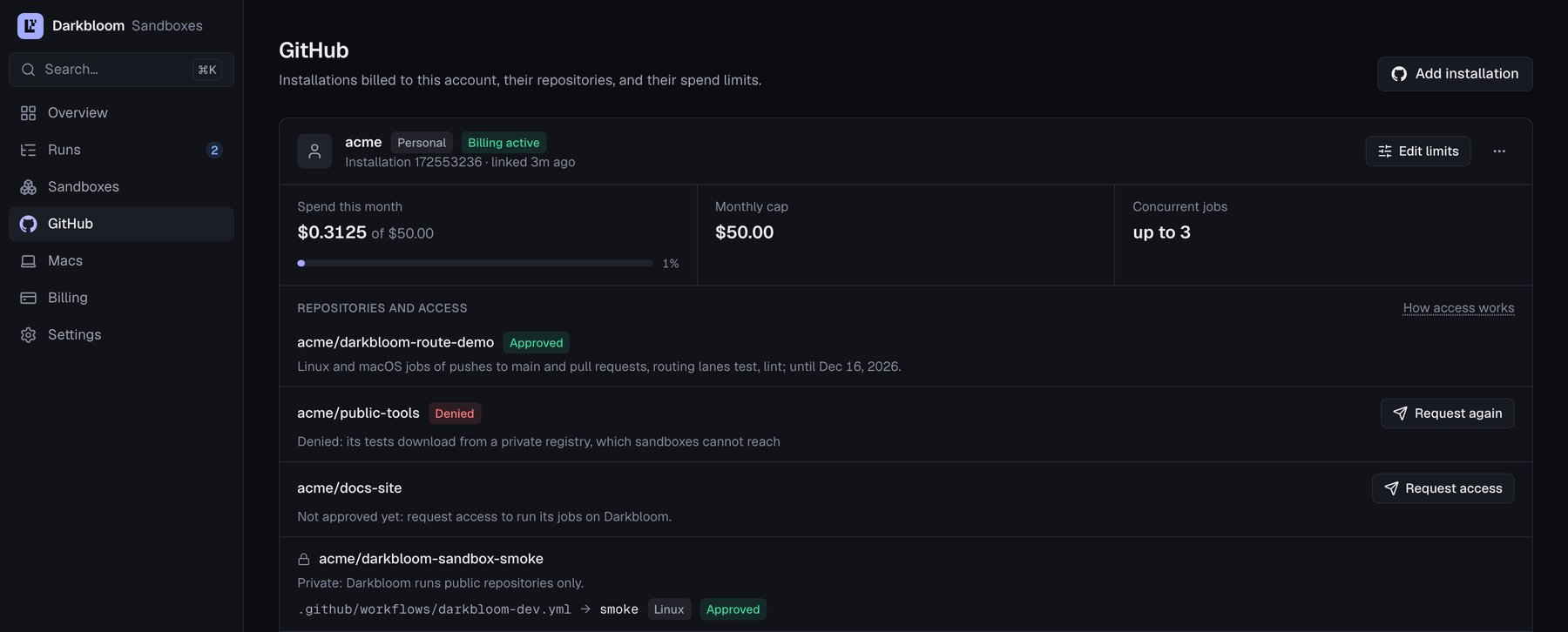
The GitHub page in the sandbox console: a linked installation with its repositories, spend this month, monthly cap and concurrent jobs. Example data.
Request access for a repository
Each public repository on the GitHub page has Request access. A Darkbloom operator reviews it and approves or denies it; the console shows the decision:
Private repositories show Private and cannot be requested.
Tell your Darkbloom contact which hosts beyond GitHub your jobs download from
(package registries, model hubs): only reviewed hosts are reachable. See
caching and network.
Add the route workflow
-
Copy
route.ymlfrom the Darkbloom actions repository at a commit into your repository as.github/workflows/darkbloom-route.yml, unchanged. Call it locally: Darkbloom refuses the jobs of a workflow that calls a reusable workflow from another repository. -
Start the workflow with a
routejob and take each routed job’sruns-onfrom it:Each lane line is<lane> <profile> <fallback-label> [count]:countis how many jobs the lane runs (its matrix size, at most 16). Keep theroutejob’spermissions: {}: the route workflow’s job holds exactly what its calling job grants, so it then holds no token permission. -
Set the repository variable
DARKBLOOM_ROUTINGtoon(Settings → Secrets and variables → Actions → Variables). Any other value keeps every lane on its fallback.
- declare read-only token permissions (
readornone) on the job or the workflow; - use no secrets (none in the job, the workflow’s
envor the local actions and reusable workflows it uses), noenvironment,services,containeror container actions; - not share a workflow with a call to another repository’s reusable workflow.
Add the watchdog workflow
A lane routed to Darkbloom can only run on a Darkbloom runner. So that a run never waits for one for hours (Darkbloom down, its service unreachable), also copywatchdog.yml from the same commit into your repository as
.github/workflows/darkbloom-watchdog.yml, unchanged.
Every 10 minutes, with your repository’s own GITHUB_TOKEN (actions: write
and checks: write, which it declares), it cancels a run whose Darkbloom job
has waited queued with no runner for 30 minutes since it was created while no
Darkbloom job of the run got a runner, also when other Darkbloom jobs of the
run ran, and re-runs its route job: the new attempt’s lanes fall back. It
rescues a run at most once, never re-runs a run someone else cancelled, and
leaves a run alone while Darkbloom’s own watchdog is rescuing it (a Darkbloom watchdog check on the commit).
It cannot tell a job that waits at your concurrency or resource limit from a
fault: raise DARKBLOOM_WATCHDOG_MINUTES above such waits. Repository
variables: DARKBLOOM_WATCHDOG off turns it off; DARKBLOOM_WATCHDOG_MINUTES
(15 to 1440) changes the wait; DARKBLOOM_ROUTE_JOB names your route job when
it is not the workflow’s Select Runners. Re-running repeats what your jobs do,
so add it only where that is safe (CI checks, not deployments).
See the job run
- The route job’s summary in each run lists every lane’s runner and why.
- Runs lists your Darkbloom jobs: state, outcome, runner class, charge (held, settled or released, with the reason) and integrity; each links to its GitHub job. The detail shows the timeline from queued to finished.
- Billing shows your balance, each charge (rate, hold, billable seconds, cost) and the rates.
- Receipts: the Mac that ran a job signs a receipt for it, which Darkbloom verifies. Verified means the Mac’s attested add-on signed it; Unverified means it could not be checked (the run’s result still stands). The commit also gets a Darkbloom sandbox integrity check.
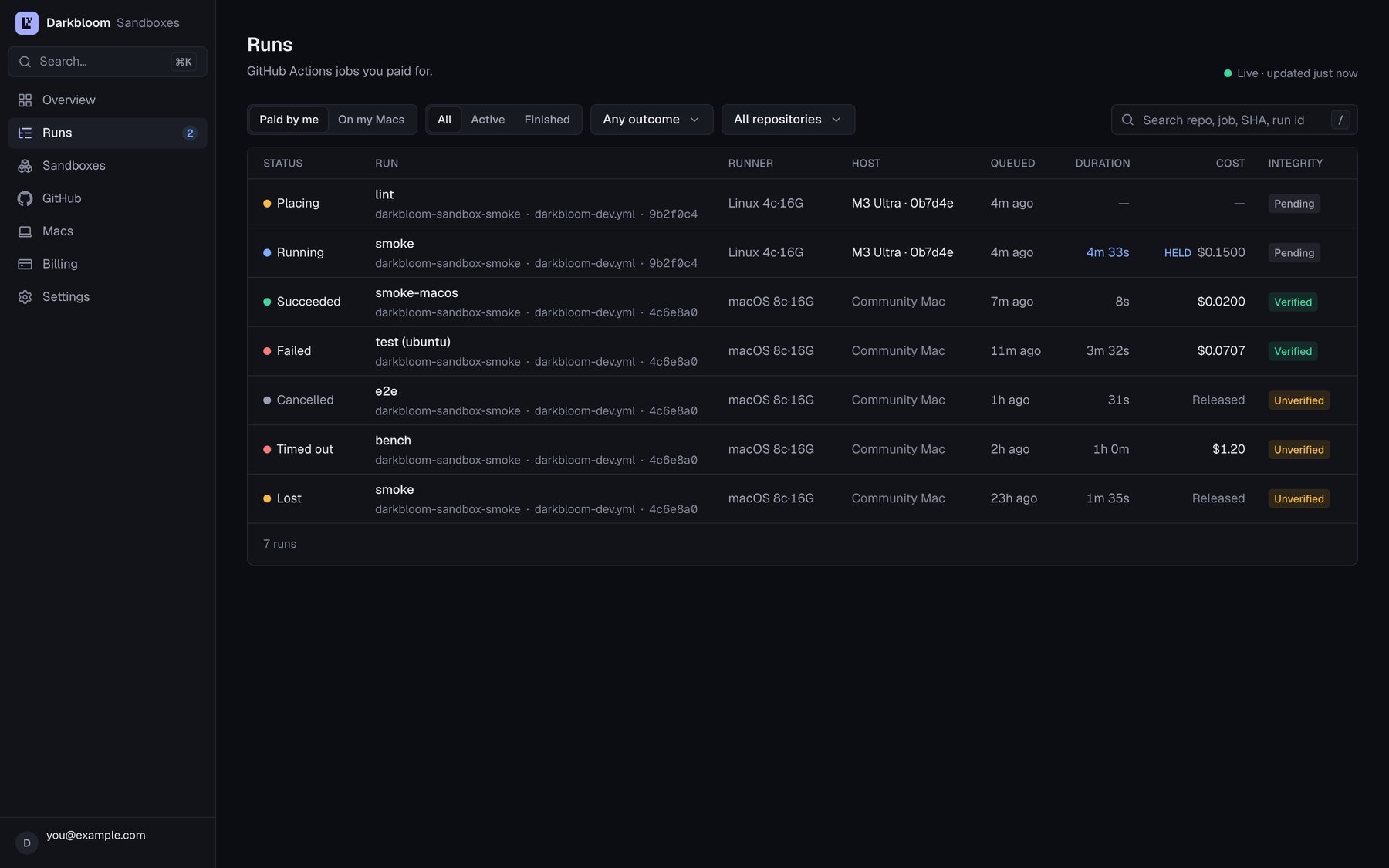
The Runs page in the sandbox console: each job's state, runner, charge and integrity. Example data.
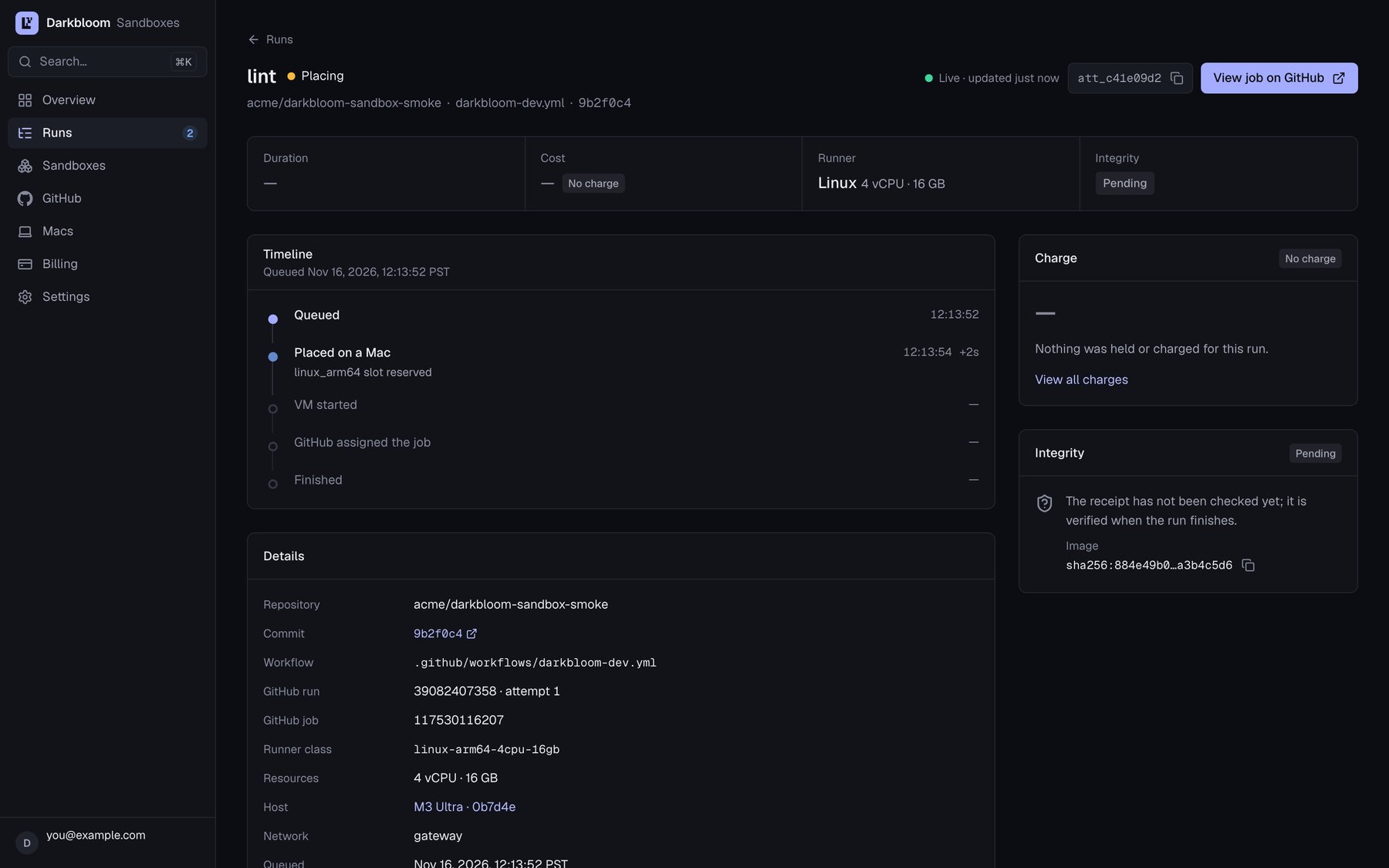
A run's page in the sandbox console: its timeline from queued to finished, charge and integrity. Example data.