

status is the first place to look when a Mac is not taking jobs, when an image will not download, or when you want to know what the Mac is doing.
darkbloom sandbox status --json, which returns the add-on’s own schema 1 document unchanged.
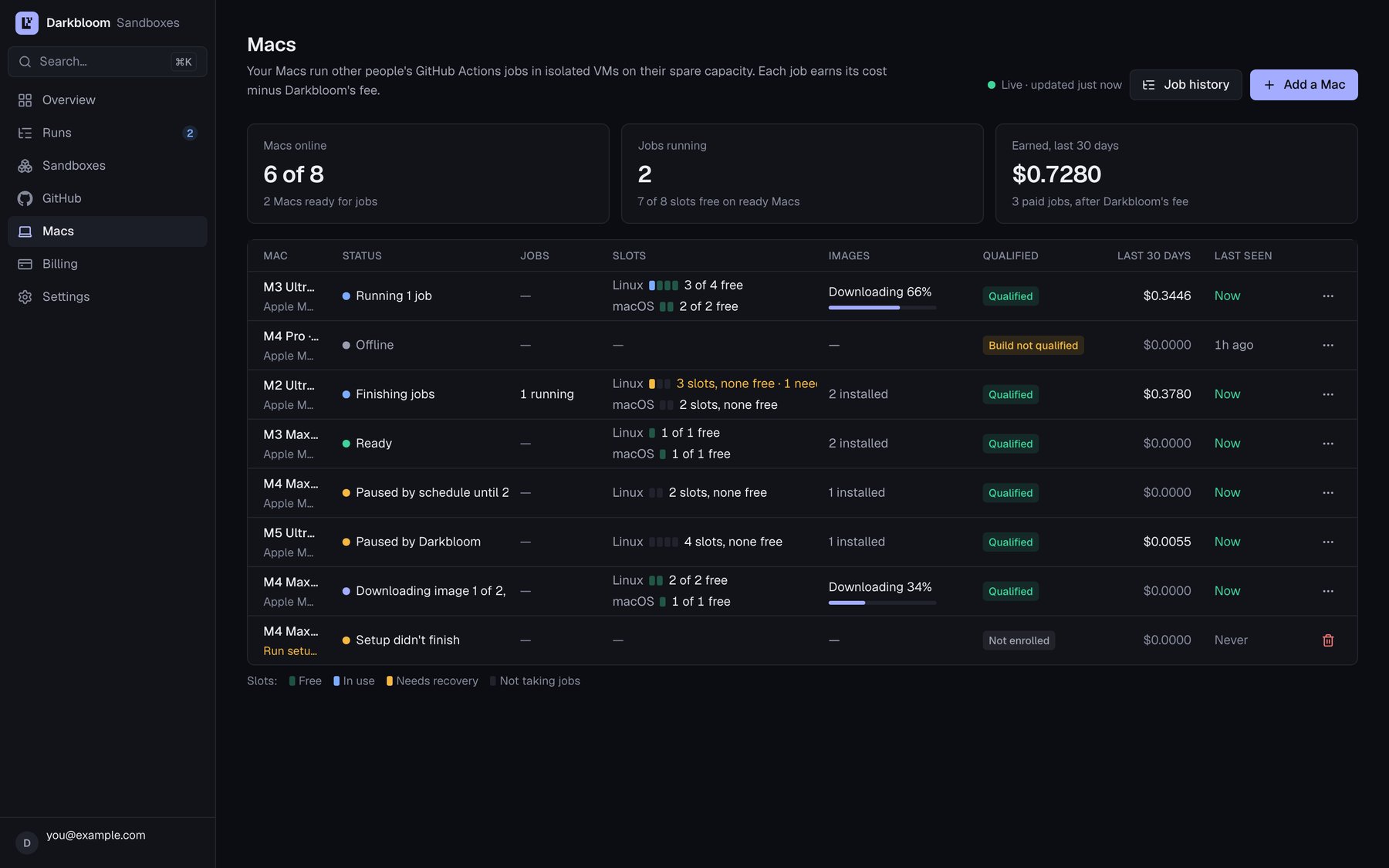
The Macs page in the sandbox console: each Mac's state, slots, images and qualification. Example data.
darkbloom status adds a Sandboxes: line while the add-on is installed.
States
The JSONstate is one of these. The first line is the human detail; the examples below show its wording.
Waiting for approval and the waitlist
Approve this Mac at https://api-sandbox.darkbloom.dev/device (code WDJB-MJHT, expires at 12:57): this Mac enrolls by itself once approved, also after a restart
Approve with the same Darkbloom account that should receive the Mac’s earnings. A darkbloom login session cannot approve a Mac. The code lasts 15 minutes, and the line shows when it expires. Running setup again keeps the same code, so you do not need a new one. If nothing waits for the code any more, the line says to run the installer again, which keeps the code.
With the owner waitlist, the line names the code, the page, and that the Mac enrolls by itself once Darkbloom approves it, also after a restart. The console shows your request, and the Mac waits up to 7 days for Darkbloom to decide.
If the Mac hosted before, approving its code replaces the old host. The approval page asks you to confirm the replacement before it approves the code.
Downloading images
While the first image downloads:Downloading its Linux image: 42%
A Mac with a Linux image installed and a macOS image still coming takes Linux jobs meanwhile:
Ready for Linux jobs only (free slots: Linux 1 of 1); downloading its macOS image: 42%
An image that does not fit above the free-space floor and the slots’ room waits for space, and the other images come first:
its macOS image waits for disk space: free at least 9 GiB (10 GB) on this Mac's disk
If downloads keep failing, the line says they are retried and points at the agent log. If the plane serves no image, the line says no image is installed and the plane serves none to download.
Ready
Ready for jobs (free slots: Linux 1 of 1, macOS 1 of 1)
The Mac is connected, not paused, and has an image. The plane still places each job by the cores, memory and disk the Mac reports free, so a larger job may need more room than a free slot suggests.
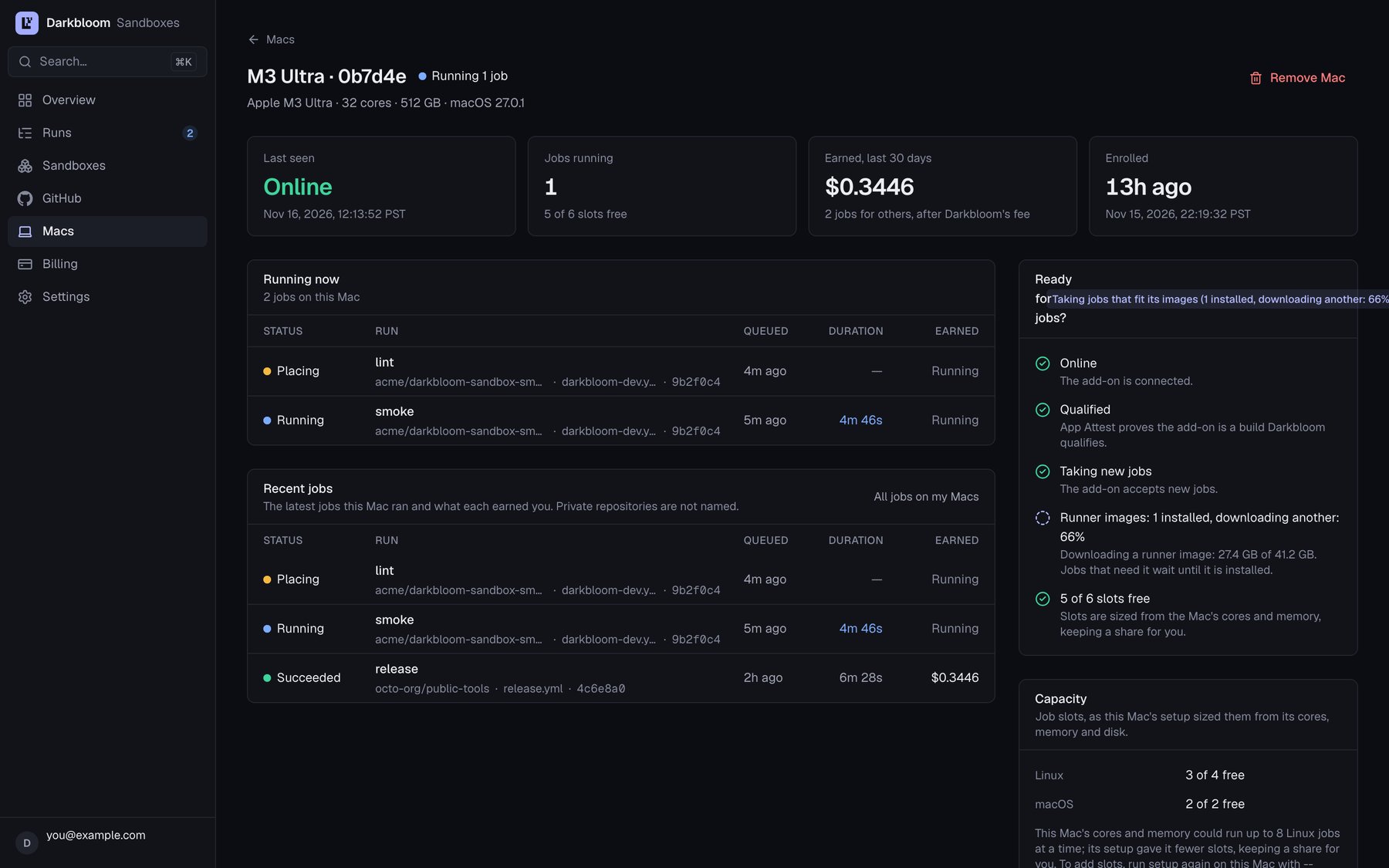
A Mac's page in the sandbox console: its readiness checklist and free capacity. Example data.
Ready; the inference provider is releasing memory for a job: the provider is pausing for a job that is about to start.Ready; inference runs, and your choice (darkbloom-sandbox provider-hold) keeps new jobs away meanwhile: yourneverorwhen_idlepolicy is holding jobs back while inference serves.
Running
Running 1 job
Jobs are running and are paid for their time. pause stops new jobs; the running ones finish.
Paused
Paused by you: no new jobs; resume with darkbloom-sandbox resume
Paused by schedule until 07:00: no new jobs; change it with darkbloom-sandbox schedule
No new job starts, and no agent sandbox starts or resumes. Jobs already running finish and are paid. A pause by hand stays after restarts and updates. If a job is finishing, the line says how many. darkbloom sandbox resume takes work again; darkbloom sandbox pause stops it. For the schedule, use the add-on’s schedule command as shown in scheduling and pause.
Updating
Installing an update once 1 job finishes
The agent stopped taking jobs and waits for the running ones to finish before it swaps the app. You do not need to enroll again.
Stopped
The agent is not running: it starts at login, or run the installer again
The Mac is enrolled, but the agent is not running. Log in at the desktop. If the Mac is paused, the line says so. If the agent does not come back, run the installer again; it repairs the install without uninstalling.
Error
App Attest key stopped working
Ifstatus says this Mac’s App Attest key stopped working, the Mac gets no jobs. This can happen after an unexpected restart.
Run the installer again, the same command as the first time. Do not uninstall: uninstalling downloads every image again. The installer keeps the Mac’s images, slots and storage and asks for a new code. That code replaces the Mac’s old host, and the installer says which. Approve it with the same account as the first time, and confirm the replacement: on the approval page, tick I am re-enrolling …, then Approve & replace.
Darkbloom refuses the code without that confirmation: This enrollment code replaces an existing Mac and requires explicit confirmation. When the new host connects, Darkbloom removes the old host, so the Macs page shows this Mac once.
If the approval page refuses the code even so, stop the installer if it still waits, make the Mac forget its old host, then set it up again:
The inference provider cannot be held
When an inference provider answers on its socket but the add-on cannot pause it, the Mac takes no new jobs until it can, or until no provider runs there. The line names the reason and the fix:
Your own
provider-hold --policy never is not an error. It keeps jobs away by itself, and detail says so.
Free disk and waiting images
Darkbloom keeps a floor of free space on every disk: a tenth of the disk, at least 50 GiB and at most 100 GiB (54 to 107 GB). No job starts, and no image downloads, if that could push free space below the floor. When an image does not fit above the floor and the slots’ room, it waits while the other images come, so a Mac with a Linux image still takes Linux jobs.status names the image and the space to free. The JSON has bytes_to_free and the image’s own detail. An image that waits counts the smaller images that wait before it too.
If no image is installed at all, the line also offers to fit the slots to the space you have: running the installer again recomputes them.
From add-on 1.3.7 the first line also says when a sandbox image waits:
low disk: free at least 12 GiB (13 GB) on this Mac's disk for macOS sandboxes
The Mac offers those sandboxes again once that much is free. Darkbloom sees the same number and may ask you to free it.
df -h ~ is what the plan counts as Avail. Finder can show more free space because it counts purgeable space, which macOS frees only when it needs to. Restart, or remove Time Machine local snapshots (tmutil listlocalsnapshots / lists them), to free it now.
If free space falls below the floor while jobs run, the add-on stops the running jobs within about 10 seconds and deletes what they wrote. Darkbloom runs those jobs elsewhere.
Work disks
status shows each disk with its free space, its floor and its slots:
/Volumes/FastSSD: online, 1.6 TB free, 100 GiB stays free; Linux 2 (1 free), macOS 1 (1 free)
The internal disk’s line says this Mac's disk. A disk that is not connected says so, and that its slots take no jobs until it is back. A disk that came back is checked before its slots take jobs again:
/Volumes/FastSSD is not mounted: its 2 slots take no jobs until it is back/Volumes/FastSSD is back: its slot takes jobs once its images are checked
--disk if you want to change the disks.
The build cache and workspaces
status shows the build cache as a line such as on, 3.2 GiB used of 32 GiB (~/DarkbloomSandbox/agent/state/storage). In --json, its state is on, waiting_for_space when less than 8 GiB is left for it, unavailable when its directory cannot be used, or off when it is turned off. Workspaces have their own allowance and line.
If the cache is waiting, free the space the line names. If it is off, size it again with the installer, or turn it back on. Jobs and images always come first: the cache gives way at once, deleting its oldest entries.
A Mac that never finished setup
Setup finishes within a minute of your approval: the Mac proves itself with App Attest and connects. If it stops in between (the installer failed or was interrupted, the Mac went to sleep or restarted), the console’s Macs page lists an entry that says Setup didn’t finish, never seen, with a Remove button. Darkbloom issued it a credential, but it never proved itself or never connected, so it gets no jobs and earns nothing. For the first 15 minutes the entry says Finishing setup instead.- Run setup again on that Mac, the same command as the first time. It finishes the setup it started, or enrolls the Mac anew with a code to approve. In that case the code replaces the old entry when you confirm the replacement, and the new host replaces it once it connects (add-on releases after 1.3.8; earlier ones leave the old entry, which you remove).
- Remove the entry with Remove on its row or its page. It leaves your Macs at once; nothing changes on the Mac.
- Or leave it. Darkbloom may remove an entry whose Mac never proved itself once a week has passed since it enrolled and since the Mac last tried; its page then says when. A Mac that keeps trying, or that proved itself once, is never removed this way.
Common messages
Logs
darkbloom sandbox logs shows the last 50 lines of the add-on’s log; -f follows it, and -n sets how many lines. The log is ~/DarkbloomSandbox/agent/agent.log.